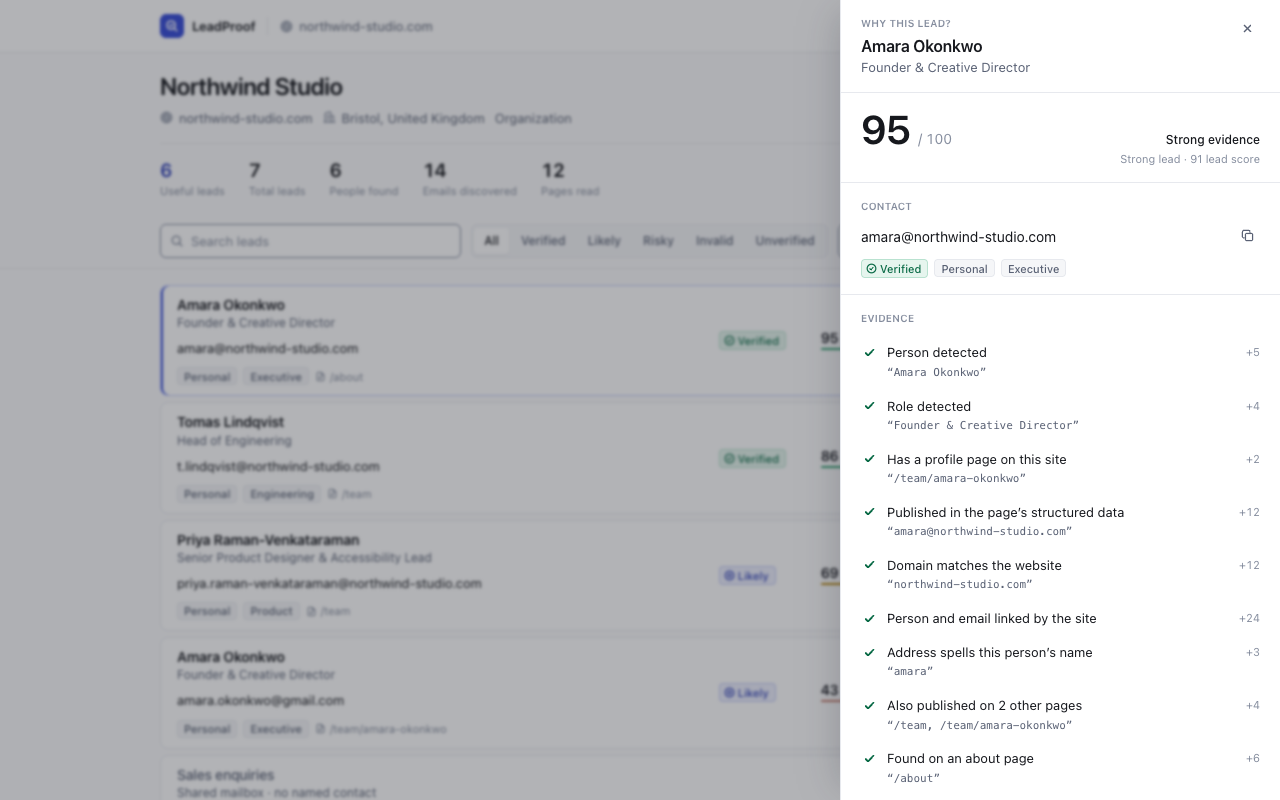
Open “Why this lead?” on any result. The arithmetic below is the
score — there is no second calculation to drift from it.
How to read it
A number you can argue with
Every lead starts at 18 — what a well-formed address at a real,
non-disposable domain has already earned. Evidence adds from there. Weak evidence
subtracts.
Association weighs most. How the site linked the person to the
address, not whether the two happened to sit near each other.
Repetition weighs least. One site agreeing with itself is not
four sources agreeing. Capped at four points.
100 is unreachable. The best case lands at 95. No web page can
offer certainty, so nothing prints a number claiming it.
Evidence can subtract. An ambiguous match or a throwaway
domain takes points off, listed with its minus.
Amara Okonkwo
Founder & Creative Director
amara@northwind.example.com
Verified
95out of 100 — strong evidence
The evidence behind this lead and the points each signal contributed
Person detected
+5
Role detected
+4
Has a profile page on this site
+2
Published in the page’s structured data
+12
Domain matches the website
+12
Person and email linked by the site
+24
Address spells this person’s name
+3
Also published on 2 other pages
+4
Found on an about page
+6
Domain accepts email
+5
Starting score 18, evidence +7795 / 100
Four distinctions
The whole product is four words kept apart
Collapsing them is where the exaggeration gets in.
Found≠Lead
A scraped address is a string. A lead has a person, a role and evidence behind it
— and only the second kind spends your allowance.
Confidence≠Value
One asks whether the record is correct, the other whether it is worth your time. A
well-evidenced info@ is high on one and low on the other.
Verified≠Deliverable
The domain has mail servers and accepts mail. Whether that one mailbox exists, no
client-side tool can know — so none of them claims to.
Public≠Permission
Published is not consent. Under GDPR, PECR and CAN-SPAM that duty is the
sender’s — yours. LeadProof sends nothing itself.
Captured from the built extension
Not mocked up, and not a state the product cannot reach
The real extension running a real scan against a test site. The numbers are whatever
it actually produced.
The result
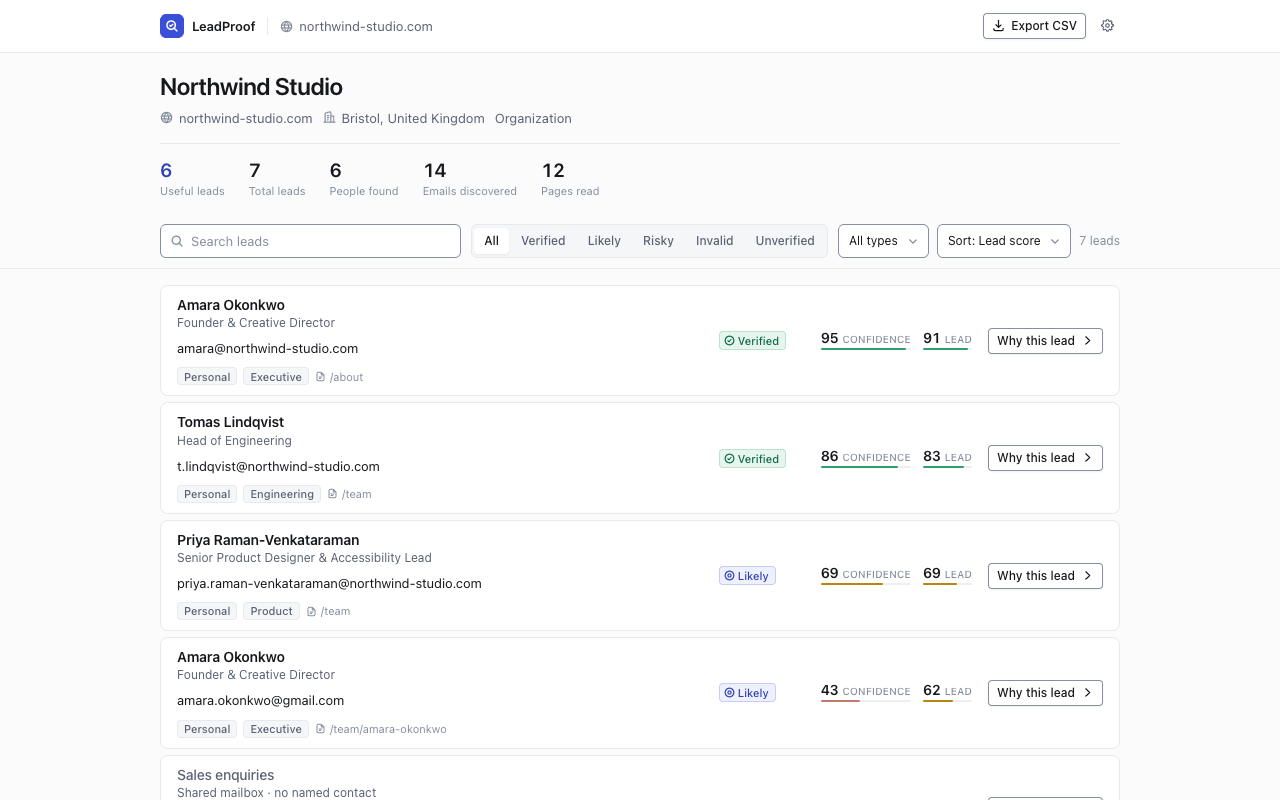
Who, what they do, the address, whether it can be trusted, and how sure.
Why this lead?
Every signal, what it was worth, and the text it was read from.
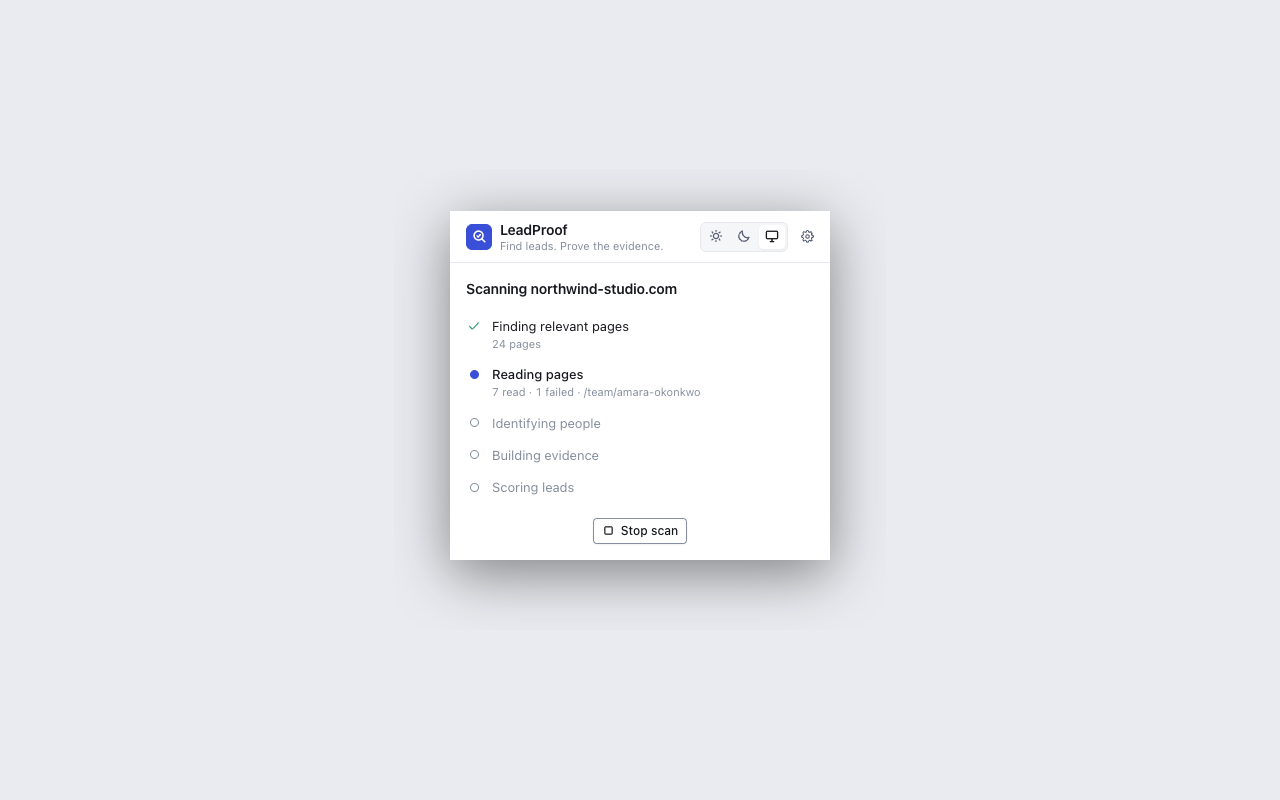
A scan in progress
Named stages and real counts. No percentage, because there isn’t one to know.
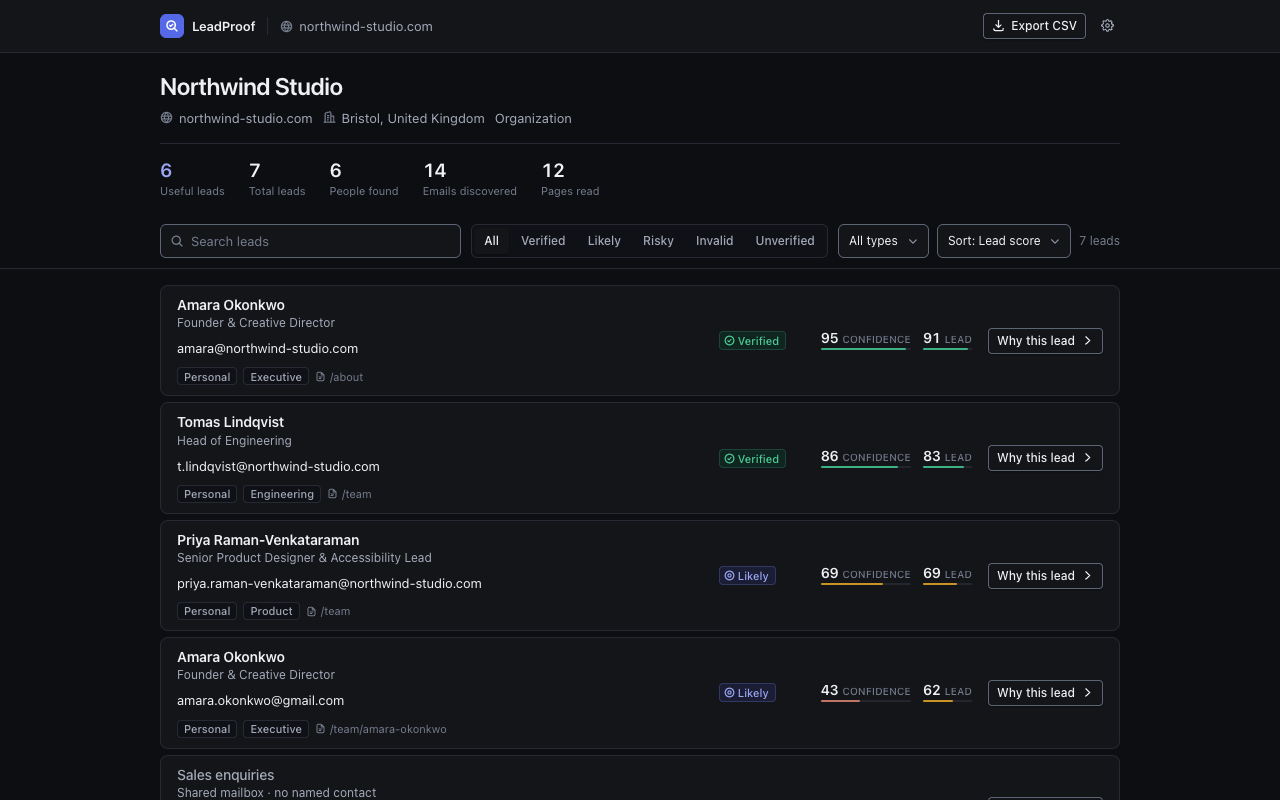
Dark, properly
Both themes are designed, and the product follows your system unless you say
otherwise.
Privacy by structure, not by promise
There is no LeadProof server to send anything to
It is the shape of the thing, not a policy we could quietly change. Each check below
takes a minute and needs nothing from us.
Read the install dialog
No “read and change all your data on all websites”. A fresh install
cannot reach any site until you name one.
Open the Network panel
Run a scan with DevTools open. Requests go to the site you asked for and nowhere
else.
Watch what it asks for
One origin at a time, when you press Scan. Nothing is bundled into an install-time
yes.
There are exactly three hosts LeadProof can ever contact, and two of
them are off until you act. The website you asked it to scan, fetched with no cookies
and no referrer. api.freemius.com, once, when you enter a licence key
— carrying that key and a random install id, nothing else.
cloudflare-dns.com, if you turn on mail-server checks, carrying the
domain of an address and never the address itself. No page content, no name,
no company, no address, no counts and no browsing activity is transmitted anywhere,
ever. The privacy policy sets out every field.
Decisions, not gaps
Six things it will not do
A tool is judged on the worst thing it is willing to assert.
Never invents a person
An address alone yields no name. john.smith@acme.com produces nothing —
on screen a guess looks exactly like a finding.
Never claims a mailbox
Verification is domain-level. No SMTP probing, no catch-all trickery, and the word
“deliverable” appears nowhere.
Never guesses ownership
An info@ inside Jane’s team card is the company’s address,
not Jane’s, and it is not filed as hers.
Never fakes progress
No percentage during a scan. It cannot know how many pages a site has until it reads
them, and a fake bar teaches you its numbers are decorative.
Never ignores robots.txt
Obeyed on every scan, with no setting to turn it off, and it identifies itself as
leadproof rather than posing as an ordinary browser.
Never sends email
It finds contacts and evidences them. It does not send, sequence, or check
do-not-contact lists — it has no honest way to.
Where you may use it
Use LeadProof only where the target website’s terms and applicable law
permit automated access and extraction.
That judgement is yours to make before you scan. LeadProof cannot read a
website’s legal terms and does not try to.
What it does enforce is the machine-readable part. Every scan reads the site’s
robots.txt first and skips whatever it asks crawlers to leave alone.
There is no setting to disable that, in any edition.
Free vs Pro
Pro sells scale. It does not sell the evidence.
The evidence drawer, confidence, lead scoring, filters and CSV export are all in the
free version. Pro raises the ceilings.
One asymmetry worth naming: Free keeps seven days of history and then
deletes — the scans and their leads, not a filter over data still on
disk. Export before it goes.
Questions
Frequently asked questions
Is this legal to use?
Reading a company’s published contact page is not the hard part — what
you do next is. An address being public is not consent to receive marketing, and
under GDPR, PECR, CAN-SPAM, CASL and their equivalents the obligations fall on the
sender. LeadProof gives you the contact and the evidence; it does not send
anything, and it cannot tell you whether your particular outreach is lawful. That
remains your call and your responsibility.
What does “Verified” actually mean?
That the domain has mail servers and accepts mail — confirmed by a real MX
lookup, not inferred from the address looking sensible. It does
not mean the individual mailbox exists; only the receiving server
knows that. The badge carries that sentence in the product, not just here. Addresses
that pass every check we can run without a network are labelled “Likely”
instead, which is a weaker and more accurate word.
Does my scan data go anywhere?
No. There is no LeadProof server, so there is nowhere for it to go. Leads, evidence,
company profiles and history live in your browser’s own storage. Buying Pro
adds one request, to api.freemius.com, carrying your licence key and a
random install id — no domains, no addresses, no counts. Switching on
mail-server checks adds one more, carrying a domain and never an address.
Why does it want access to a website?
To read the pages you asked it to read. Chrome asks for that one origin at the
moment you press Scan, not at install — which is why adding LeadProof shows no
permission warning. The extension cannot name your sites in advance, so the
permission is requested per site, by you, each time.
How many leads will I get from a site?
We will not give you a number, because it depends entirely on what the site
publishes. A studio with a team page listing eight people and their addresses gives
you eight. A site with a contact form and nothing else gives you the company profile
and perhaps one shared mailbox. LeadProof reports what it found; it does not pad the
list to look productive.
Do I need an account?
No — not for the free version and not for Pro. Pro is unlocked with a licence
key you paste in once. There is no sign-up, no password and nothing to recover.
Can I move Pro to another machine?
Yes. A licence covers one installation at a time. Remove the licence in
LeadProof’s settings — which hands the seat back before it forgets the
key — then paste it in on the new machine. You can also release a seat from
users.freemius.com. If every seat is in use, LeadProof says so in those words rather than telling you
the key is invalid.
What happens to my data if I stop paying?
LeadProof returns to the free limits, which includes seven days of history —
so scans older than that are deleted, along with their leads. Nothing is held
hostage and nothing is hidden behind a paywall you can re-open; it is removed. Your
CSV exports are files on your disk and are unaffected. If history matters to you,
export before a licence lapses.
Availability
On the Chrome Web Store
Free to install and free to use. Pro is a licence key you add later from inside the
extension — there is no account to create, and nothing to cancel if you never buy one.
What the install asks for
Nothing. LeadProof declares no website access at install, which is why Chrome does
not warn you that it can read and change your data on every site — because it
cannot. A single site is requested at the moment you press Scan on it, and a default
install can reach no other address at all.
Mail-server verification and licence activation each ask separately, the first time
you use them.