Images into a PDF
Turn your pictures into a PDF, one page per image, in the order you put them in.
Convert. Merge. Optimize. Done.
PDFCraft does the whole job inside your own browser — because there is nowhere for your files to go. No server, no account, and no permission warning when you install it.
Free, with no limits
No file cap you have to pay to lift, no watermark, no trial clock. The paid tier adds capabilities — it never takes one away.
Turn your pictures into a PDF, one page per image, in the order you put them in.
Combine any number of PDFs into a single document, with their pages kept as they are.
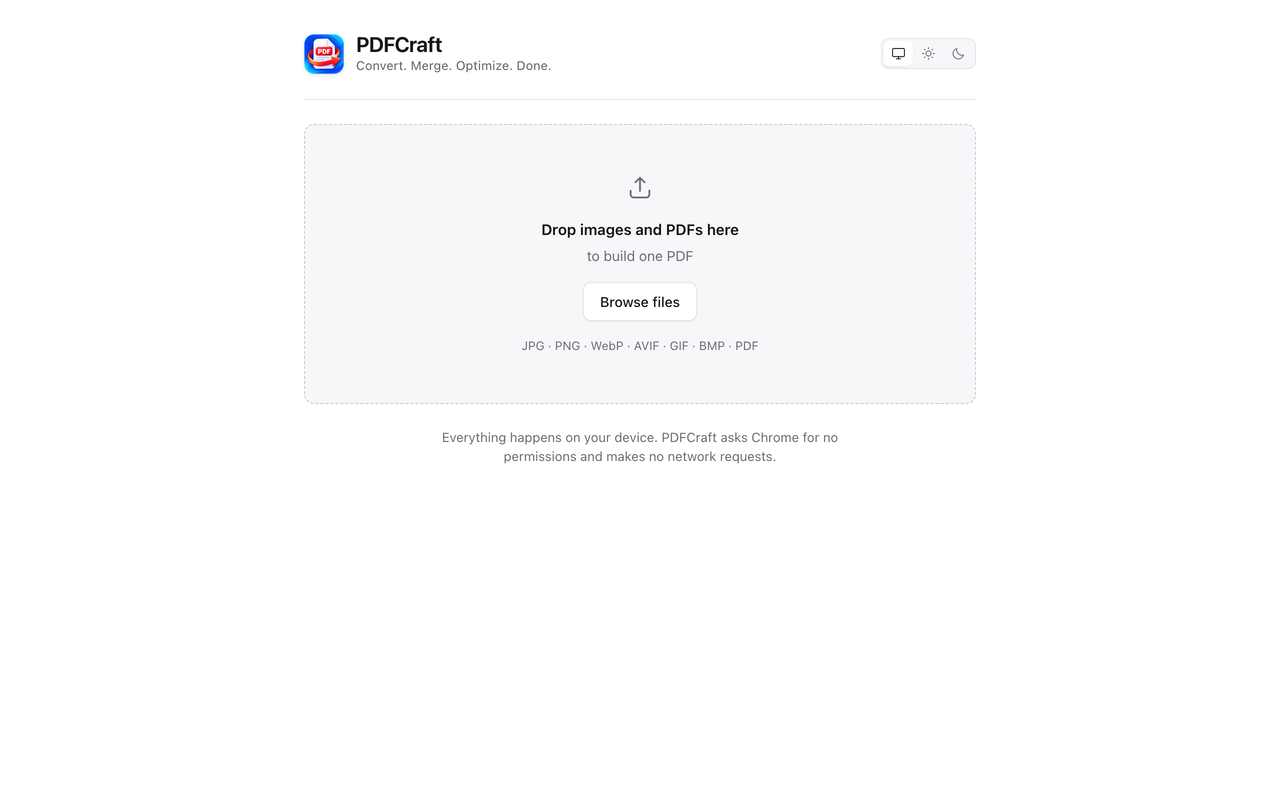
Images and PDFs in one document, in any order. Drag to rearrange, or reorder with the keyboard alone.
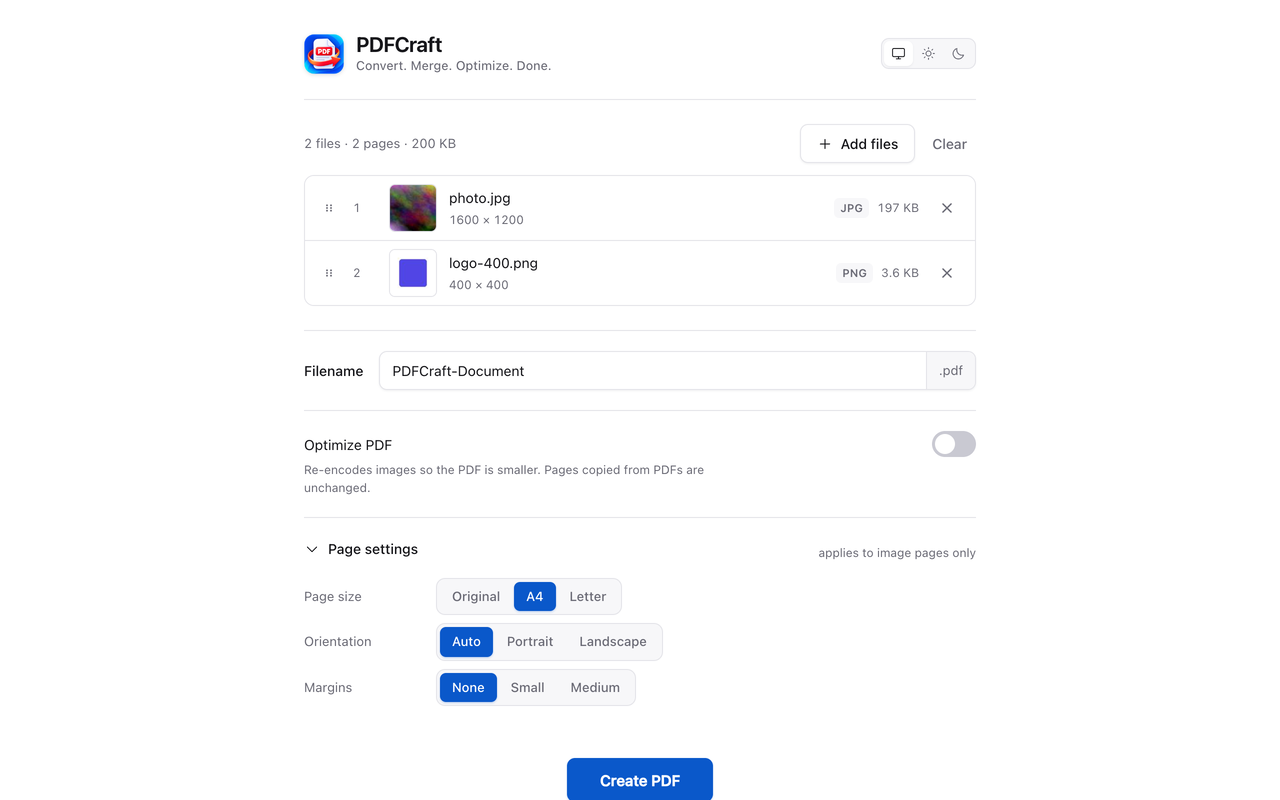
Page size, orientation and margins for the pages built from your images.
Re-encode image data before it goes in, to keep the file smaller. Off until you turn it on, and it shows you the measured before and after — never a promised percentage.
Choose the filename yourself before you download. The PDF carries no metadata at all.
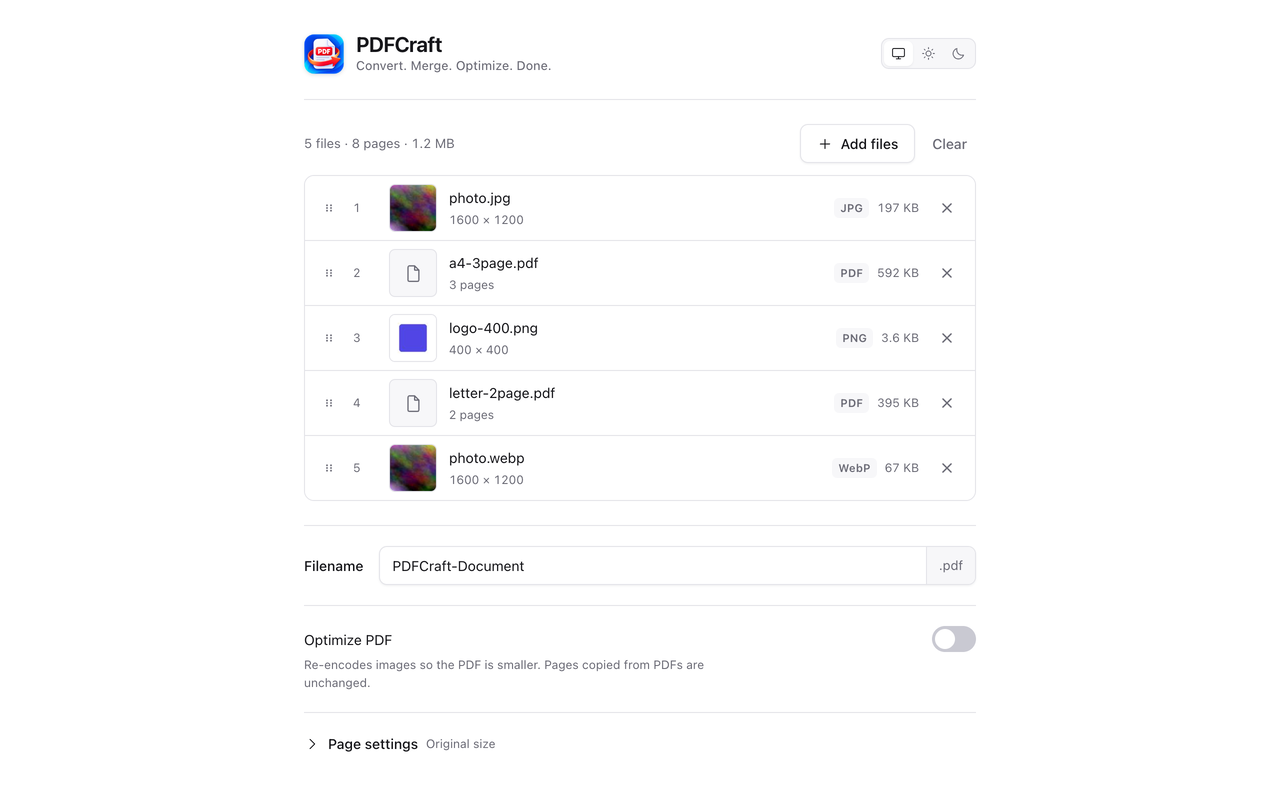
Drop in images, PDFs, or both. Anything PDFCraft cannot use it tells you about now, not after.
Drag or use the keyboard, set the page size, name the file, and turn optimization on if you want it.
The PDF is built in your browser and saved to your machine. Nothing was uploaded to build it.
The actual product
Captured from PDFCraft itself against real files — never mocked, never composited, and never a state the product cannot actually reach.
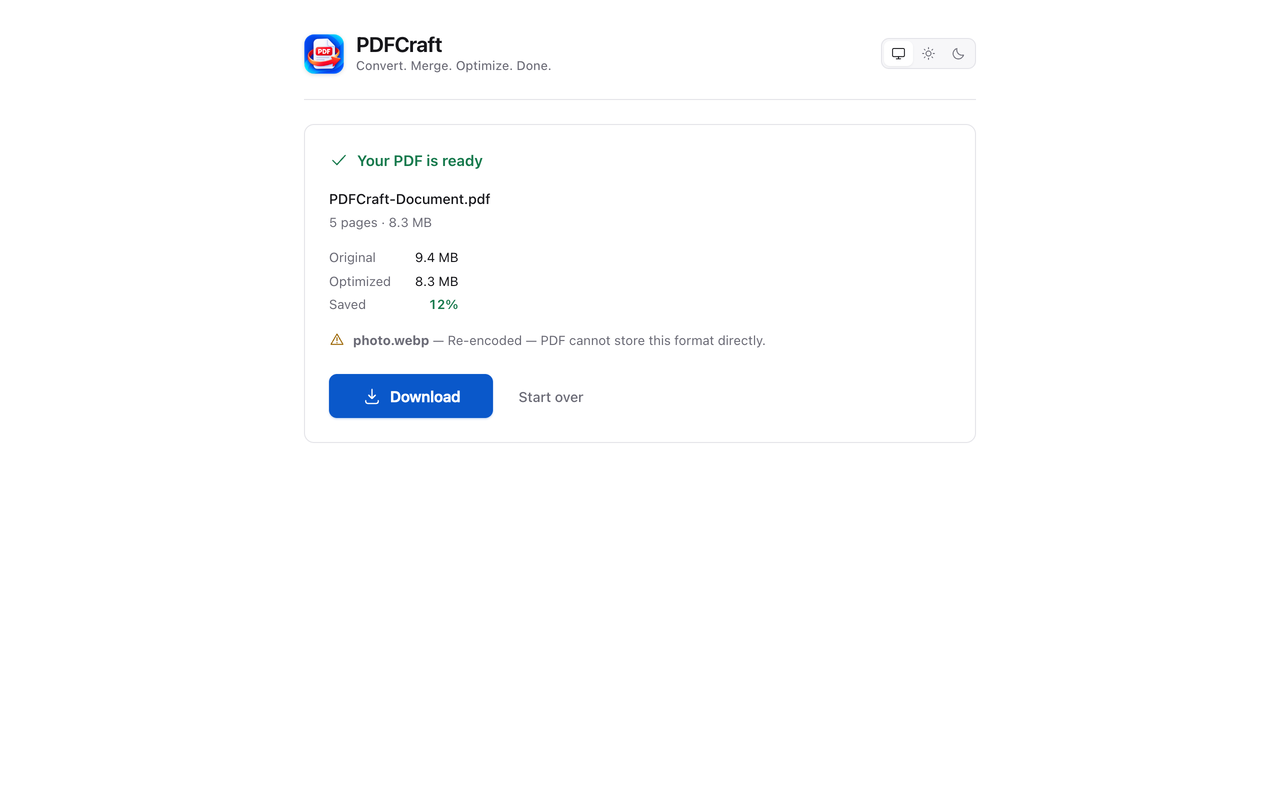
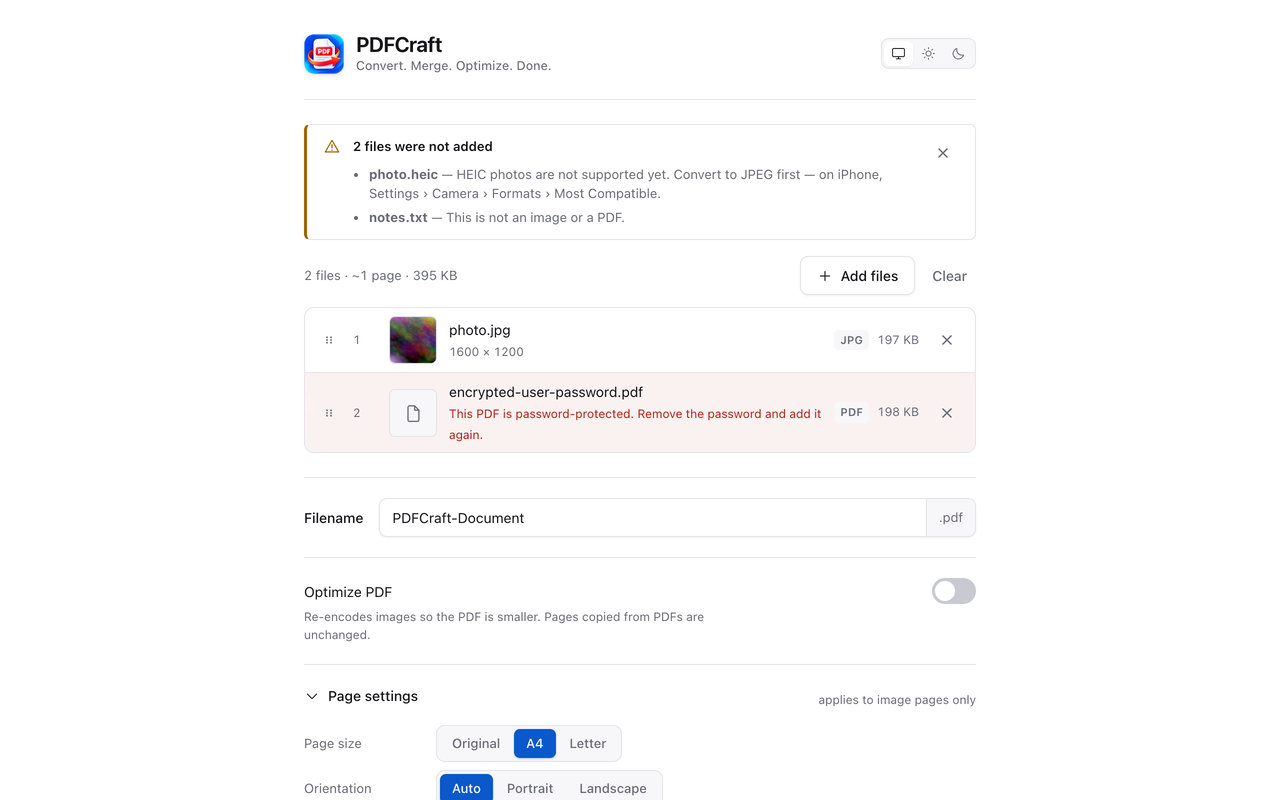
Not a promise — a property
Most PDF converters upload your files to a server and process them there. PDFCraft uses the image and PDF machinery your browser already has, which means every claim below is one you can test in about a minute.
Convert a file with DevTools open. Nothing about your document goes out, because the parts that read and convert it contain no networking code at all.
Disconnect completely and convert again. PDFCraft behaves identically, because there was never a server involved to miss.
Chrome shows no permission warning when you add PDFCraft, because there is nothing to warn about. It cannot read the pages you visit.
The one request PDFCraft ever makes is the licence check, and only if you buy Pro. It carries your licence key, a random activation id, and the word “PDFCraft” — no filename, no page count, no file content. Chrome asks your permission for it at the moment you enter a key, never at install, and PDFCraft withdraws that permission when you remove your licence. On the free version there is no network request of any kind. It is all written out in the privacy policy.
PDFCraft Pro
Pro is optional and additive. Everything the free version does, it keeps doing exactly as it did — same output, same limits, same absence of a watermark.
What a key unlocks
One licence key, typed in once. There is still no account and no sign-in, and the free version on the same machine is unchanged the moment you remove it.
1-3, 5, 8- from a PDF instead of all of it.
Pricing
Billed in US dollars by Freemius, our reseller and Merchant of Record. Cancel any time from the account link in your purchase email.
The whole product. Not a trial of one.
$0 forever
No card, no account
Pro for as long as you need it, and no longer.
$5
$3 /month
40% OFF
Billed monthly · cancel any time
Best value
The best value on Pro, and the plan most people want.
$50
$30 /year
40% OFF
Billed yearly · cancel any time
One payment. Nothing to renew and nothing to cancel.
$150
$100 one-time
33% OFF
One-time payment
Payment is taken on Freemius's own checkout page. PDFCraft never sees your card details. The amount charged, including any tax, is the one shown at checkout. Full pricing, comparison and refund policy →
Good to know
Listed here rather than discovered after you install. A clear no in advance beats a refusal you were not expecting.
Yes, on both the free and the paid version. The parts of the extension that read and convert your documents contain no networking code at all, and an automated check refuses to publish a build in which that stops being true. The two ways to confirm it yourself are the Network panel and your Wi-Fi switch.
Completely. Disconnect and it behaves identically, because there is no server to reach. Pro keeps working offline too, and the licence page tells you how long for.
Because PDFCraft asks for no permissions at install. It cannot read the pages you visit, your history, your tabs or your bookmarks. Buying Pro adds one optional host permission for the licence check, and Chrome asks for it at the moment you submit a key — never at install, and never if you do not buy.
Nothing it ever had. No watermark, no file cap you pay to lift, no trial clock, and the same PDF it always produced. Pro adds a choice of compression level, image recompression inside merged PDFs, and page ranges. See the full comparison.
Exactly three things, to api.freemius.com and nowhere else: the licence
key you entered, a random 32-character activation id generated on your device, and
the word “PDFCraft”. No filename, page count, file size or file content
is part of it. The privacy policy spells this out in
full.
No — not for the free version and not for Pro. Pro is unlocked with a licence key you type in once. There is no sign-in, no password and nothing to recover.
The ones your browser can already display, which is most of what you are likely to have. HEIC is the notable exception. Anything PDFCraft cannot use it names before you convert, rather than after.
Yes to both. Pro is sold by Freemius, our reseller and Merchant of Record — manage or cancel from the account link in your purchase email. Lifetime is a one-time payment, so there is nothing to cancel. Refunds are handled by Freemius and go back to your original payment method; the terms are on the pricing page.
A file that will not convert, a licence that did not unlock, a refund question, or an idea worth building. There is no in-app reporting — that would need a network request — so email is the whole support channel, and it is read.