
User guide / Free and Pro
Free and Pro
Free is a full product, not a trial. Pro adds more for people with a big vault.
Free
- Saves every chat from all five AIs.
- Keeps your newest 200 chats open, with search, projects, tags, collections and export.
- Backup to a file and restore, any time.
- Pictures from your chats, saved and shown.
- 51 languages, light and dark.
- No account.
What "locked" means
If you have more than 200 chats, the older ones are locked. A locked chat is still saved in full on your computer. Nothing is deleted. You see its title and date. To read it, you need Pro, or you can continue the chat on its AI site so it becomes recent.
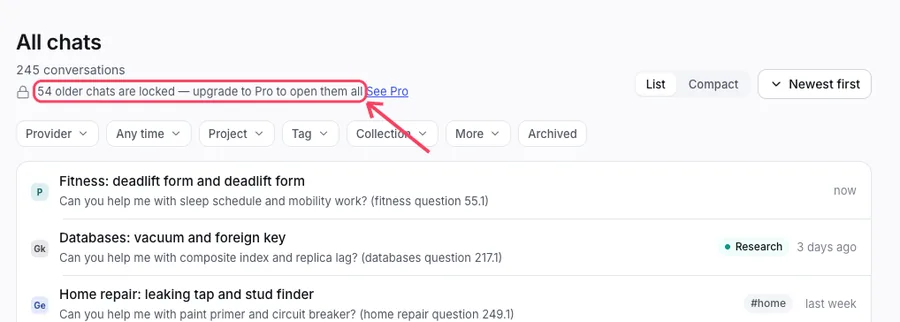
Pro
- Opens every chat, not only the newest 200.
- Encrypted backups with your own passphrase.
- Backup to Google Drive or Dropbox, by hand or automatic.
Summaries and Ask my vault are free. They use your own AI key. See Use AI with your own key.
Try Pro, buy it, or switch it on
Open Pro & licence in Settings, or click the Pro card in the left menu. You see the plans and a button, Start 7-day free trial.
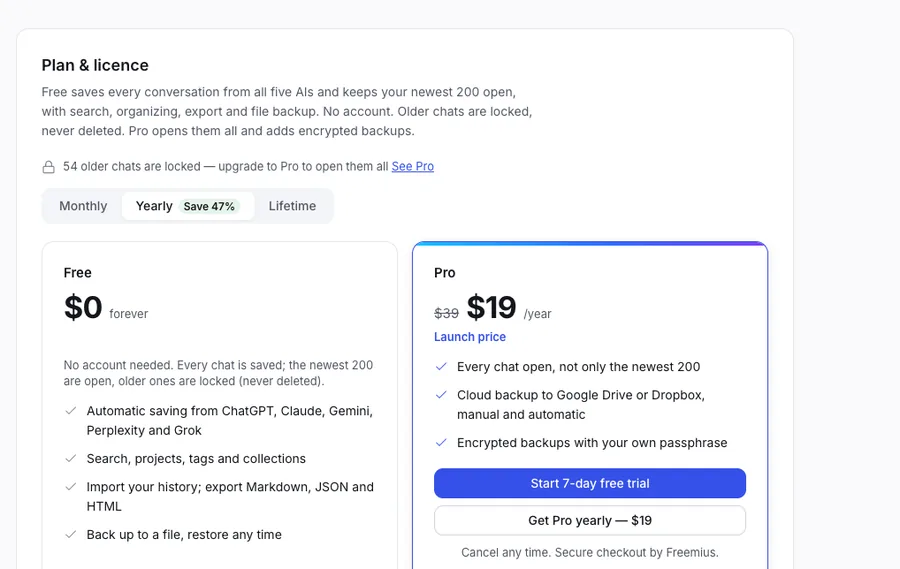
After you buy, Freemius emails you a licence key. Paste it into the box and click Activate. There is no account to create.
One key works in one browser at a time. Activate it in a new browser and the old one goes back to Free by itself.
If Pro ends, nothing is deleted. Your newest 200 chats stay open and the older ones lock again. For prices, see the pricing page.